How to Install APK Files on Android: APK vs Google Play Store Apps
Description
Android users often face an important choice when downloading apps: should they install apps directly through APK files or use the Google Play Store?
Both methods allow users to install applications on Android devices, but they work differently. APK downloads give users more freedom and flexibility, while the Google Play Store offers stronger security and easier updates.
Many users download APK files to access apps unavailable in their country, install older versions, or try beta releases before official launch. On the other hand, the Google Play Store provides a centralized and trusted ecosystem managed by Google.
What Is an APK File?
APK stands for Android Package Kit. It is the file format Android uses to install applications.
An APK works like a package that contains everything needed to install an app.
APK File Includes:
- App code
- Images and resources
- Security certificates
- Permissions
- Configuration files
- Manifest information
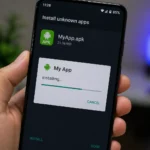
Users can install APK files manually without using the Play Store.
What Is the Google Play Store?
The Google Play Store is the official Android app marketplace operated by Google.
It allows users to download, update, and manage apps safely from a centralized platform.
The Play Store checks apps for malware and policy violations before publishing them.
Apps available through the Play Store usually follow Google’s rules for security and privacy.
Salam Bet Game is an example of an APK file.
APK Downloads vs Google Play Store Apps
The biggest difference between APK downloads and Play Store apps lies in how they are distributed.
APK Downloads
- Installed manually
- Downloaded from external websites
- Require unknown sources permission
- May not receive automatic updates
Google Play Store Apps
Easier to manage
Installed directly through Google
Verified by Google systems
Updated automatically
Security Differences Between APK Files and Play Store Apps
Security is one of the most important factors when comparing APK downloads and official app stores.
Security of APK Files
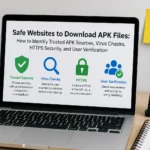
APK files can be safe, but safety depends on the download source.
Safe APK Sources
- Official developer websites
- Trusted APK repositories
- Verified tech communities
Risks of APK Downloads
- Malware
- Spyware
- Fake applications
- Banking trojans
- Hidden tracking
- Fake login screens
Because APK files come from different websites, users must verify the source carefully.
Security of Google Play Store Apps
Google Play Store apps are generally safer.
Google uses several layers of security.
Google Play Security Systems
Play Protect
Google Play Protect scans apps regularly.
Developer Verification
Developers must meet certain standards.
Policy Enforcement
Google removes apps violating rules.
Automatic Malware Detection
Google scans apps before publishing.
Security Comparison Table
| Feature | APK Files | Google Play Store |
| Malware Risk | Medium to High | Low |
| Source Verification | User Responsibility | Google Managed |
| Virus Scanning | Manual | Automatic |
| Fake Apps Risk | Higher | Lower |
| Protection Level | Variable | Strong |
Update Systems: APK vs Google Play Store
Updates are another major difference.
APK Update System
APK-installed apps usually require manual updates.
Users must:
- Find new APK version
- Download updated file
- Install over old version
APK Update Challenges
- Time-consuming
- Risk of outdated versions
- Missing security patches
- Version conflicts
Google Play Store Update System
The Play Store offers automatic updates.
Benefits of Play Store Updates
- Background updates
- Security patches
- Bug fixes
- New features
- Easy management
Users can choose:
- Automatic updates
- Manual approval
- Wi-Fi-only updates
Update Comparison Table
| Feature | APK Files | Play Store Apps |
| Automatic Updates | No | Yes |
| Update Speed | Manual | Fast |
| Security Patches | User Controlled | Automatic |
| Ease of Updating | Lower | High |
Performance Comparison
Performance refers to how apps run on a device.
Many users believe APK apps perform differently than Play Store apps.
APK Performance
APK performance depends on the source and app quality.
Advantages
- Access to lightweight versions
- Older stable versions available
- Beta features accessible
Risks
- Poor optimization
- Unstable builds
- Crashes
- Modified app issues
Play Store Performance
Play Store apps usually provide stable performance.
Benefits
- Tested on multiple devices
- Optimized updates
- Better bug fixing
- Stable releases
Google encourages developers to improve compatibility.
Performance Comparison Table
| Feature | APK Files | Play Store Apps |
| Stability | Variable | High |
| Optimization | Depends on Source | Usually Better |
| Crash Risk | Medium | Lower |
| Device Compatibility | Variable | Strong |
Privacy Comparison
Privacy matters when installing apps.
Users often wonder whether APK files are safer for privacy.
Privacy Risks of APK Files
APK files may request unnecessary permissions.
Common Privacy Risks
- Hidden tracking
- Background data collection
- Spyware
- Microphone access
- Location tracking
Unknown APK sources may not follow privacy standards.
Privacy Standards in Google Play Store
Google Play Store requires apps to disclose permissions.
Privacy Benefits
- Permission transparency
- Data safety labels
- Developer identity verification
- App review system
Google also removes apps that violate privacy rules.
Privacy Comparison Table
| Feature | APK Files | Google Play Store |
| Permission Transparency | Medium | High |
| Developer Accountability | Low | High |
| Data Safety Labels | Rare | Available |
| Privacy Oversight | Limited | Strong |
Convenience Comparison
Convenience plays a major role in app installation.
APK Convenience
APK files offer flexibility.
Advantages
- Install unavailable apps
- Access beta versions
- Use older app versions
- Download without Play Store
Drawbacks
- Manual installation
- Unknown sources settings
- Manual updates
- Extra steps required
Play Store Convenience
The Play Store simplifies app management.
Advantages
- One-click installation
- Automatic updates
- Built-in search
- Easy uninstall
Centralized app management
Convenience Comparison Table
| Feature | APK Files | Google Play Store |
| Ease of Use | Medium | Very High |
| Installation Speed | Manual | Instant |
| Updates | Manual | Automatic |
| App Management | Separate | Centralized |
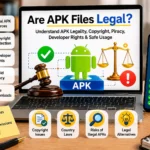
APK Legality
APK files are legal when:
- Distributed by developers
- Not pirated
- Not modified illegally
Illegal APK Examples
Unauthorized modifications
Cracked paid apps
Pirated software
Google Play Store Legality
Play Store apps generally follow licensing rules.
Apps violating copyright may be removed.
Long-Term Reliability
Long-term reliability matters for frequent app use.
APK Reliability
APK reliability depends on:
- Developer updates
- Android compatibility
- Server support
- APK source
Older APKs may stop working over time.
Play Store Reliability
Play Store apps usually provide better long-term support.
Benefits
- Regular updates
- Ongoing developer support
- Compatibility testing
- Security maintenance
APK vs Google Play Store: Full Comparison Table
| Category | APK Files | Google Play Store |
| Security | Medium | High |
| Updates | Manual | Automatic |
| Privacy | Variable | Better |
| Convenience | Flexible | Easier |
| Stability | Depends | More Stable |
| Long-Term Support | Medium | High |
| Legality | Depends | More Reliable |
When Should You Use APK Files?
APK files are useful when:
- Apps are unavailable in your region
- Older app versions are needed
- Developers provide direct downloads
- Testing beta apps
When Should You Use Google Play Store?
The Play Store is ideal when:
- Security matters most
- Automatic updates are preferred
- Easy management is needed
- Trusted app sources are important
Common Myths About APK Files
Myth 1: APK Files Are Always Dangerous
Not true. Trusted APK sources can be safe.
Myth 2: APK Apps Run Faster
Performance depends on optimization.
Myth 3: Play Store Apps Never Contain Malware
Google reduces risk but cannot guarantee perfection.
Myth 4: APK Files Are Illegal
Many APKs are legal when distributed correctly.
Conclusion
APK files and Google Play Store apps both offer unique benefits.
APK downloads provide flexibility, early access, and freedom from app store restrictions. However, they also require caution, manual updates, and source verification.
Google Play Store apps offer stronger security, automatic updates, privacy protections, and long-term stability.
For most users, the Play Store remains the safest and easiest option.
However, APK files can be useful when installed responsibly from trusted sources.
The best choice depends on user needs, technical knowledge, and comfort level with Android app management.
Frequently Asked Questions
- Are APK files safer than Play Store apps?
Usually no. Play Store apps generally provide stronger security.
2. Do APK apps update automatically?
Most APK-installed apps require manual updates.
3. Can APK files damage a phone?
Unsafe APK files may contain malware.
4. Are APK downloads legal?
Yes, legal APKs exist when distributed properly.
5. Why do people prefer APK files?
Many users want early access, older versions, or unavailable apps.
6. Is Google Play Store always safe?
It is safer than most APK sources but not perfect.